
Minimum Gaming PC Requirements for 2026: What You Actually Need

Are you thinking about building your first gaming PC in 2026 or just trying to game on a tight budget?
Then you really need to understand what minimum requirements actually mean.
In this guide, I'll break down the true minimum specs for gaming in 2026 and help you build a PC that runs modern games without wasting money.
At Apex Gaming PCs, you can start your build around the games and performance you're looking for.
For more gaming PC guides, check out our PC Troubleshooting and Hardware Guide playlist.
Edited: 9/21/2026
Minimum vs. Recommended Gaming PC Specs
What's the difference between minimum and recommended specs?
For a lot of games that list both, minimum specs are usually the bare minimum you need to run the game at something like 1080p and 30 FPS.
Recommended specs are usually what the developers recommend to achieve around 1080p or 1440p at 60 to maybe 120 FPS.
Following the recommended requirements can make a huge difference in how the game feels and how smoothly it runs.
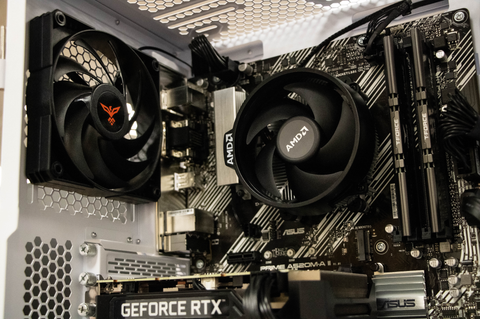
Minimum Hardware Requirements for Gaming in 2026
So, what are the minimum hardware requirements for running a gaming PC in 2026?
CPU
A lot of modern CPUs have moved beyond the four-core days of years past.
Now, a lot of computers will have six or eight cores, and that's usually a good sweet spot.
Higher core counts like 12 or 16 aren't super necessary for gaming, so sticking with a six-core or eight-core CPU is usually your best bet.
For a minimum CPU, something like the Intel Core i3-12100 or AMD Ryzen 3 4100 can handle a lot of games, but you'll want to manage your expectations.
For a recommended CPU, an Intel Core i5-14600K or AMD Ryzen 5 9600X is a good sweet spot for high-performance gaming while still staying on a relatively good budget.
Importantly, pay attention to motherboard compatibility because not every CPU fits every motherboard.
You should also look at the clock speeds of newer CPUs. Sometimes that can help you find a better CPU or potentially save some money when the clock speeds aren't that different.

GPU
Next, we'll talk about the GPU.
The GPU is the most important part for gaming. It's ultimately what renders all of the graphics for your game and will be the main determining factor in how well your computer performs.
For modern games, something like the RTX 3060 or Intel Arc B570 is a good minimum GPU for a lot of modern and heavier games.
These typically come with enough VRAM for older or well-optimized titles.
For a recommended GPU, an RTX 5070 can handle a lot of demanding games while giving you good ray tracing performance in games that support it.
The AMD Radeon RX 9070 XT is another good option for strong rasterization performance and good ray tracing performance while still being decently priced compared with the market.
Some games are much more GPU-intensive than others.
Games like Apex Legends, Cyberpunk 2077, and Clair Obscur: Expedition 33 can be very graphically intensive and benefit from a stronger GPU.
Resolution matters too.
1080p is much easier to run than 1440p or 4K.

RAM
Next, we'll talk about RAM.
In 2026, 8GB of RAM is an absolute minimum, although it might not be enough for a lot of modern games.
It can still be enough for older titles and more esports-focused games.
Ideally, you'll have dual-channel RAM to maximize performance with the CPU.
For newer games, you'll want at least 16GB of RAM.
For newer and more modern gaming PCs, 16GB or even 32GB is what I'd recommend.
16GB is enough for most games and most productivity tasks, although multitasking can become an issue if you have too many programs open at once.
32GB is a really good sweet spot for DDR5, especially if you want strong memory performance and enough capacity to handle gaming and multitasking with ease.

Storage
Now, let's talk about storage.
A traditional hard drive is no longer ideal for gaming.
At minimum, you want a 512GB SATA SSD, but I'd recommend an NVMe SSD because of the much higher performance and bandwidth.
A 512GB or 1TB drive is a good starting point for Windows and a couple of games.
But you'll probably want more storage if you don't want to constantly uninstall and reinstall games.
A lot of newer motherboards have multiple NVMe M.2 slots, so if your computer supports it, having a dedicated Windows SSD and a separate SSD for your games can be really helpful.
That way, if you ever need to reinstall Windows or change things around, you can keep your games on the secondary SSD and reinstall Windows without having to reinstall your entire game library.
Motherboard
Now we'll talk about the motherboard.
Your motherboard needs to match the CPU you picked in both socket and chipset.
For example, with the minimum requirements we're talking about here, an Intel 12th-generation CPU can pair well with something like a B660 motherboard.
If you have an older motherboard or you're upgrading the CPU, make sure the BIOS is updated to handle any compatibility issues you might run into.
The motherboard itself won't usually change gaming performance very much.
What it does affect is how much you can expand the computer later.
So choose something you like that has the number of USB ports, SSD slots, and other features you actually need.
Power Supply
You never want to cheap out on your power supply.
A good, reliable PSU helps make sure the computer stays stable and runs smoothly.
A bad power supply can cause crashes in weird ways and can be difficult to diagnose.
You need something with enough capacity for the hardware you're putting into the system.
For most computers, that might look like a 750-watt power supply with at least an 80 Plus Bronze rating.
For newer, higher-performance PCs, an 850-watt or even 1,000-watt power supply with an 80 Plus Gold rating may make more sense.
The 80 Plus Gold rating means the power supply is more efficient and will most likely be quieter while it's running because it doesn't need to work as hard.

Software Requirements for Gaming in 2026
So, what are the software requirements for gaming in 2026?
If you're still using Windows 10, you can probably get by with a lot of games.
That said, newer games may require Windows 11 or perform better because they're designed around newer features available in Windows 11.
Always make sure your GPU drivers are up to date too.
Outdated drivers can cause crashes in newer games, while newer drivers often include optimizations that help new releases run their best.
You can also run Linux if you're feeling ambitious, but you'll want to look at more detailed guides to understand the potential downsides of gaming on Linux.
For beginners, I'd recommend sticking with Windows.
Gaming PC Add-Ons Worth Considering
Now let's talk about some add-ons.
These aren't mandatory, but they can make a big difference.
Cooling and Airflow
For a lot of cases, the minimum airflow setup is at least two fans, one bringing cool air in and one exhausting hot air.
For higher-performance computers, you may want six fans or even to maximize the number of fans your case can support to improve the flow of cool air in and hot air out.
For minimum-spec CPUs, the included stock cooler or a basic air cooler will usually be fine.
Something like a Thermalright Assassin can be a great budget CPU cooler.
For higher-performance CPUs with more cores, a liquid cooler might make more sense.
There are a lot of good AIOs available right now.
For example, the Lian Li Galahad series has options in both 240mm and 360mm radiator sizes.
Gaming Monitor
Another important part of a gaming PC setup is the monitor.
Your monitor is ultimately what you're looking at while you're playing, and a good gaming monitor can elevate the experience more than a lot of people expect.
When you're budgeting for a PC, make sure you're leaving enough room for a decent monitor too.
You can game at 1080p and 60Hz, but for modern gaming I'd recommend a higher refresh rate.
For competitive esports games, something like a 1440p 240Hz monitor can be a great option now that they're much more affordable and reliable.
Essential Gaming Peripherals
Let's break down the essential peripherals.
Gaming Mouse
A good gaming setup isn't complete without a good mouse.
A modern gaming mouse with a high-performance sensor can be really useful for FPS games and other titles where aiming is important.
Headphones
Good headphones are another important addition because sound matters a lot in many games.
A good pair of headphones can make the game more immersive and can also help you hear enemies coming from around corners.
Mechanical Keyboard
Finally, a mechanical keyboard can make typing and gaming on your computer more enjoyable.
It can also give you a better experience than a cheap membrane keyboard from a big-box retailer.
Ultimately, I can't recommend one specific mouse, keyboard, or pair of headphones for everyone.
Everyone's hands, heads, and preferences are different.
You need to find the peripherals that are comfortable for you and that work best for the games you play.
They aren't going to improve your FPS, but they can definitely improve your overall gaming experience.
Written by Will Wilson
Photo Credits: Pavan Bhakta
Will a pile ssd work on a pc to play games. If so what would be the best external hard drive to get.
Leave a comment